
7 Best Journey App Alternatives in 2026 (Compared Side by Side)

Looking for a Journey journaling app alternative? Independent comparison of 7 apps — from AI-powered to privacy-first. Honest pros, cons, pricing, and AI features.

📌 TL;DR — Journey App Alternatives
Best Journey alternative: Life Note — mentor-driven AI depth beyond basic features. Also consider Rosebud, Day One, or Daylio.
Journey is a solid cross-platform journaling app with Google Drive sync and multimedia support. But its AI features are basic, many features sit behind a paywall, and the UI feels dated compared to newer apps. The best alternative depends on your priority: Rosebud alternative for AI-guided reflection, Life Note for mentor-driven depth, Day One for polished design, or Daylio for zero-effort mood logging.
Journey — the cross-platform journaling app with Google Drive sync
Journey has been a reliable journaling app since its launch, covering iOS, Android, Mac, Windows, web and Chrome OS (6 platforms). Its key differentiator is data ownership: entries sync via Google Drive or OneDrive, meaning you can access your journal outside the app and aren't locked into a proprietary system.
Journey offers templates, automatic metadata (weather, location), shared journals for families, Coach AI for prompt generation, and rich media support including photos, video, and audio. It's a feature-rich option that covers the basics well.
Methodology: Each app was independently evaluated on journaling depth, AI capability, pricing transparency, platform availability, and privacy posture. This article is published on Life Note's blog — Life Note is one of the apps listed below. We've included honest strengths and limitations for every option, including our own.
Why People Look for Journey Alternatives
Users typically switch from Journey because of limited AI depth, dated interface design, aggressive paywalling of features, or concerns about ChatGPT integration and data policies.
Journey is a competent app, but several issues drive users to explore alternatives:
- Basic AI features. Journey's Coach AI generates prompts and offers guided reflections, but it doesn't hold conversations, remember past entries, or identify patterns across your journaling history. In 2026, users expect AI that actively learns from their writing.
- ChatGPT integration data concerns. Journey uses OpenAI's ChatGPT for its AI features. This means your journal entries pass through OpenAI's servers — a privacy concern for users writing about therapy, relationships, or sensitive personal material. OpenAI's data usage policies add a layer of uncertainty.
- Dated interface. While functional, Journey's UI hasn't kept pace with modern design standards. Users coming from polished apps (Day One, Apple Journal, Reflectly alternative) often describe the interface as cluttered or overwhelming.
- Feature paywalling. Many of Journey's most useful features — Coach AI, advanced templates, media attachments — require premium. The free tier is functional but limited enough that users feel pressure to upgrade quickly.
- No end-to-end encryption. Journey relies on Google Drive or OneDrive security rather than implementing its own end-to-end encryption. For users writing about deeply personal material, this feels like a gap.
7 Best Journey Alternatives in 2026
1. Day One — Best for Polished Traditional Journaling
Day One — the veteran journaling app with 10+ years of history
Weighing the two directly? Our Day One vs Journey comparison puts the 2026 prices, platforms, encryption and migration steps side by side.
Day One is Journey's most direct competitor. It offers a similar multimedia journaling experience — automatic metadata, multiple journals, rich media — but with significantly more polish. Day One pioneered physical book printing from journal entries, offers a beautiful map view of where you wrote each entry, and has 10+ years of refinement behind its interface.
Where Journey emphasizes platform breadth, Day One emphasizes depth. The writing experience is cleaner, the automatic metadata richer (health data, step counts, music), and the Apple ecosystem integration deeper.
Strengths:
- Physical book printing from journal entries — unique in the category
- Beautiful map view showing where you wrote each entry
- End-to-end encryption available
- Automatic health, weather, location, music, and activity metadata
- 150,000+ five-star reviews and Apple App of the Year award
Limitations:
- $49.99/year with annual-only billing — no monthly option
- Limited AI features (Day One Labs) — behind Journey's Coach AI in some respects
- Best experience is Apple-first — Android and Windows apps lag in features
- Documented sync issues that have led to data loss for some users
Pricing: Free plan available. Premium: $49.99/year.
2. Rosebud — Best for AI-Guided Reflection
Rosebud — conversational AI journaling that remembers your story
Rosebud represents what Journey's AI could be. Instead of generating prompts and stopping there, Rosebud holds genuine conversations about your entries. It asks follow-up questions, builds long-term memory of your reflections, and identifies behavioral patterns across weeks and months.
Curious how Rosebud compares beyond Journey? Our Life Note vs Rosebud vs Mindsera comparison covers the conversational AI apps head to head.
If you're leaving Journey because its AI feels shallow, Rosebud is the most significant upgrade. It's backed by $6M from Bessemer Venture Partners and includes therapist-designed workbooks covering ACT, nervous system regulation, and relationship patterns.
Strengths:
- Conversational AI that asks follow-up questions in real time
- Long-term memory connecting past entries to current themes
- Therapist-designed guided workbooks (ACT, relationships, nervous system)
- Voice journaling in 20 languages
- Pattern recognition across entries over weeks and months
Limitations:
- Daily usage cap on AI interactions
- Long-term memory paywalled behind Bloom ($12.99/month)
- Terms of service allow anonymized data use for AI training — no opt-out
- No multimedia journaling — primarily text-focused
Pricing: No free plan since Sept 30, 2026 (free trial). Bloom: $12.99/month or $107.99/year.
3. Life Note — Best for Mentor-Guided Depth
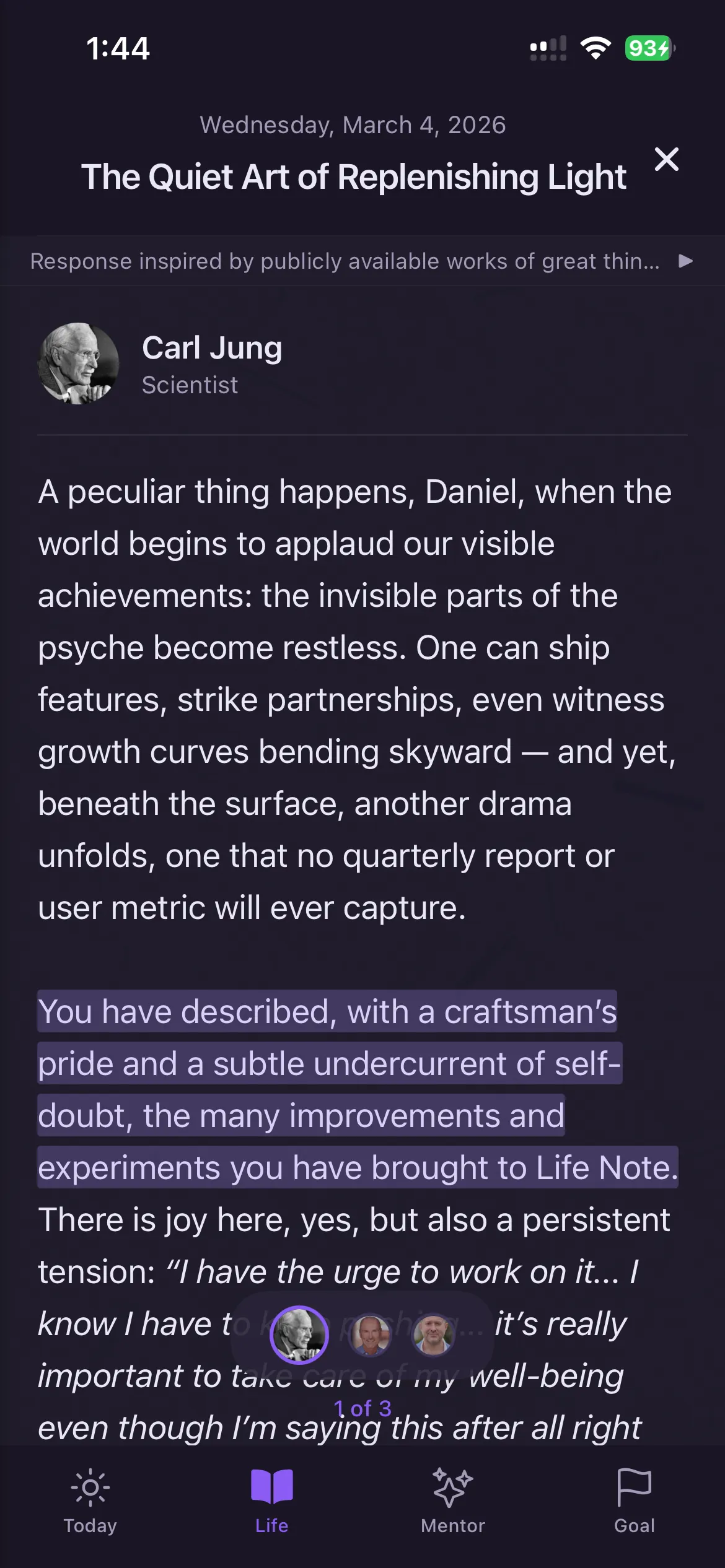
Life Note — 1,000+ AI mentors offer philosophical depth beyond generic AI
Life Note takes AI journaling in a different direction than either Journey or Rosebud. Instead of a generic AI assistant, it offers 1,000+ AI mentors modeled on historical thinkers — Carl Jung, Marcus Aurelius, Virginia Woolf, and others. Each mentor applies a distinct philosophical or psychological framework to your reflections.
Where Journey's Coach AI gives you a prompt, Life Note's Jung mentor asks what shadow aspect of yourself a situation reveals. Its Stoic mentor guides you through the dichotomy of control. The result is reflection guided by specific intellectual traditions rather than generic AI conversation.
Strengths:
- 1,000+ AI mentors spanning philosophy, psychology, spirituality, and creativity
- Each mentor applies a distinct framework — not one-size-fits-all AI
- Available on iOS, Android, and web with full feature parity
- Weekly reflection letters from your chosen mentor
- Strong content library with 350+ guided journaling articles
Limitations:
- Mentor-based approach may not suit users who prefer direct AI conversation
- No Google Drive/OneDrive sync — uses its own cloud storage
- No shared journals for families or couples
- Smaller user base than Journey or Day One
Pricing: Free plan available. Premium: $10.99/month or $99.99/year.
4. Notion — Best for DIY Journal Systems
Notion — build exactly the journal you want
Notion appeals to the same type of user who chose Journey for its flexibility — but takes customization to another level. You can build databases with custom properties (mood, energy, gratitude), create templates for different journaling styles, and use Notion AI for reflection and summarization.
If what you liked about Journey was the templates and structure, Notion gives you infinite templates and total structural control. The tradeoff: you have to build it yourself. There's no out-of-the-box journaling experience.
Strengths:
- Infinitely customizable — databases, templates, formulas, views
- Notion AI for summarization, prompt generation, and entry analysis
- Available on all platforms (web, iOS, Android, Mac, Windows)
- Free for personal use
- Doubles as a complete life management system
Limitations:
- Requires significant setup — no journaling experience out of the box
- Not purpose-built for reflection (no mood tracking, no guided prompts)
- No end-to-end encryption — Notion can access your content
- AI is general-purpose, not journaling-specific
- Can become overwhelming for people who just want to write
Pricing: Free plan available (limited AI trial). Plus: $10/month; full Notion AI requires Business ($20/member/month).
5. Reflectly — Best for Mood Tracking
Reflectly — structured daily check-ins that track emotional patterns
Reflectly fills a gap Journey doesn't address: systematic emotional tracking. Its structured 3-part daily check-in (what happened, how you felt, what's next) creates a consistent emotional baseline over time and identifies mood-activity correlations that free-form journaling misses.
With 10M+ downloads, Reflectly has proven that many people prefer guided structure over blank pages. If you found Journey's templates helpful but wanted more emotional intelligence in the app, Reflectly offers exactly that.
Strengths:
- Structured check-in format reduces blank-page anxiety
- Mood-activity correlation tracking over time
- AI-personalized prompts based on your history
- Beautiful, polished interface
- 10M+ downloads — proven model
Limitations:
- No free-form journaling — the structure is the ceiling
- Mobile only — no web or desktop app (unlike Journey)
- AI is pre-LLM era prompt personalization, not conversational
- Aggressive upsell UX with countdown timers
Pricing: Free plan available. Premium: $9.99/month or $59.99/year.
6. Penzu — Best for Privacy-First Journaling
Penzu — military-grade encryption for maximum journal privacy
Penzu addresses the privacy concern that many Journey users share. While Journey stores entries on Google Drive or OneDrive (with those companies' security), Penzu implements AES-256 encryption with custom lock passwords per journal. No one — not even Penzu — can read your entries.
For users who chose Journey's Google Drive sync for data ownership but want stronger encryption, Penzu offers a privacy-first alternative with deliberate simplicity.
Strengths:
- AES-256 encryption with custom lock passwords
- Deliberately simple — writing-first, no feature bloat
- Web, iOS, and Android
- Email reminders and writing prompts
- PDF export for offline backup
Limitations:
- No AI features of any kind
- Dated interface — hasn't had a major visual update in years
- Limited media support — primarily text
- Smaller development team, slower updates
Pricing: Free plan available. Pro: $19.99/year. Pro+: $49.99/year.
7. Daylio — Best for Zero-Effort Logging
Daylio — journal without writing a word
Daylio is the anti-Journey. Where Journey offers rich multimedia journaling with templates and AI, Daylio strips journaling to two taps: select your mood, select your activities, done. A day logged in under 10 seconds.
With 20M+ downloads, Daylio has proven that many people don't actually want to write — they want to track. If Journey felt like too much effort, Daylio is the minimum viable journal that still produces meaningful insights over time.
Strengths:
- Two-tap mood logging — under 10 seconds per entry
- Detailed mood-activity correlation analytics
- Customizable activities, goals, and mood categories
- Works offline — local-first data
- 20M+ downloads with proven engagement model
Limitations:
- Not a journaling app in the traditional sense — minimal writing
- No AI analysis or guided prompts
- Self-reported moods may lack nuance
- Limited to iOS and Android — no web or desktop
Pricing: Free plan available. Premium: $2.99/month or $23.99/year.
Side-by-Side Comparison
| App | AI Depth | Platforms | Price/Year | Best For |
|---|---|---|---|---|
| Journey | Basic (Coach AI) | All 6 platforms | $49.99/yr | Cross-platform flexibility |
| Life Note | Deep (mentors) | iOS, Android, Web | $99.99/yr | Mentor-guided depth |
| Day One | Basic (Labs) | iOS, Android, Mac, Web | $49.99 | Polished design + book printing |
| Rosebud | Deep (conversational) | iOS, Android, Web | $107.99 | AI conversation + memory |
| Notion | General | All platforms | Free/$120 | DIY custom systems |
| Reflectly | Basic | iOS, Android | $59.99 | Mood tracking + check-ins |
| Penzu | None | iOS, Android, Web | $19.99 | Maximum privacy |
| Daylio | None | iOS, Android | $23.99 | Quick mood logging |
What Research Says About Digital Journaling
| Study | Finding | Implication |
|---|---|---|
| Pennebaker & Beall (1986), Journal of Abnormal Psychology | Expressive writing for 15 min/day cut doctor visits to about half over 6 months | Regular journaling — digital or analog — produces measurable health benefits |
| Smyth et al. (2018), JAMA | Online expressive writing reduced PTSD symptoms in 1,497 participants | Digital journaling apps can be as effective as pen-and-paper for emotional processing |
| Ullrich & Lutgendorf (2002), Psychosomatic Medicine | Cognitive processing (analyzing meaning) outperformed emotional venting for health outcomes | AI apps that prompt deeper analysis (Rosebud, Life Note) may outperform simple mood logging |
| Baikie & Wilhelm (2005), Advances in Psychiatric Treatment | Meta-review of 200+ studies: journaling consistently improved immune function, mood, and well-being | Consistency matters more than format — choose the app you'll use daily |
| Krpan et al. (2013), British Journal of Health Psychology | Expressive writing reduced depressive symptoms and rumination in clinically depressed adults | Guided reflection apps complement professional treatment for depression |
How to Choose the Right Journey Alternative
The best Journey alternative depends on what's most important to your journaling practice. Here's a quick decision framework.
- Want the most polished writing experience? Day One — 10+ years of refinement, book printing, beautiful metadata.
- Want AI that actually learns from your entries? Rosebud (conversational AI with memory) or Life Note (1,000+ mentor frameworks).
- Concerned about Journey's ChatGPT data policies? Penzu (AES-256 encryption) or Apple Journal (on-device only, zero data collection).
- Want mood tracking, not just writing? Reflectly (structured check-ins) or Daylio (two-tap logging).
- Want total customization? Notion — build exactly the journal system you want.
- Want philosophical depth in your reflections? Life Note — 1,000+ mentors spanning psychology, philosophy, and spirituality.
What Journey Still Does Best
Journey isn't the right app to leave for everyone. It remains the best choice if you:
- Need true cross-platform support. Journey runs on iOS, Android, Mac, Windows, web and Chrome OS (6 platforms).
- Want Google Drive or OneDrive sync. Your entries live in your own cloud storage — not a company's proprietary servers. This is a genuine data ownership advantage.
- Share journals with family. Journey's shared journals feature lets couples and families contribute to the same journal. Most alternatives are single-user only.
- Use templates extensively. Journey's template library is broad and well-organized. Notion offers more customization, but Journey's templates work out of the box.
- Journal in multiple media formats. Photos, video, audio, stickers, and drawings in a single entry — Journey handles multimedia better than most AI-focused alternatives.
Limitations of This Comparison
- Bias disclosure: This article is published on Life Note's blog. Life Note is one of the seven alternatives listed. We've applied the same evaluation criteria to every app, including our own.
- Pricing accuracy: All prices verified March 2026 but may change. Journey frequently adjusts pricing and feature bundling across platforms.
- Individual experience varies: App Store ratings reflect averages. Sync reliability, AI quality, and support responsiveness vary by user.
- No app replaces professional help: These are self-reflection tools, not clinical interventions. For mental health crises, contact a licensed professional or call 988.
- Feature parity changes rapidly: Journey and all listed alternatives ship updates frequently. Capabilities may have changed since publication.
When Journey or Its Alternatives May Not Help
⚠️ When Journey or Its Alternatives May Not Help
Journaling apps support self-reflection but they are not therapy. People in active mental health crisis, with severe depression, suicidal ideation, or untreated trauma need licensed professional support — no app can replace that. Journey and its alternatives also cannot provide diagnosis, medication management, or crisis intervention. If journaling brings up overwhelming feelings, that is a sign to seek professional help, not a sign that you are doing it wrong. The goal of these apps is daily reflection, not treatment.
Frequently Asked Questions
Can I import my Journey entries into another app?
Journey exports entries in PDF and JSON format. Since your entries sync to Google Drive or OneDrive, you also have direct file access. However, no alternative offers one-click Journey import. Notion is the easiest migration target because you can import JSON data into databases. For other apps, you'll need to start fresh or manually transfer key entries.
Which Journey alternative has the best AI?
Rosebud offers the deepest conversational AI with long-term memory and follow-up questions. Life Note offers the broadest AI with 1,000+ mentors applying distinct philosophical frameworks. Journey's Coach AI generates prompts but doesn't hold conversations or remember past entries.
Is there a free Journey alternative with AI?
Life Note and Apple Journal offer free tiers, and Life Note includes limited AI features on its free plan. Rosebud ends its free plan on September 30, 2026. Apple Journal is completely free with on-device intelligence but minimal AI coaching. For full AI depth, Life Note Premium is $10.99/month or $99.99/year.
Which Journey alternative is best for privacy?
Apple Journal (on-device only, zero data collection) and Penzu (AES-256 encryption) offer the strongest privacy. Life Note and Day One also offer strong data ownership policies. Journey's reliance on Google Drive/OneDrive means your entries are subject to those companies' data policies.
Is Journey worth keeping if I only use iOS?
Journey's main advantage is cross-platform availability. If you only use iOS, Day One (polished design), Life Note (AI mentors), or Apple Journal (free, private) may serve you better. Journey's other strengths — Google Drive sync, shared journals — still matter if those features are important to you.
Related Articles

Journal with 1,000+ of History's Greatest Minds
Carl Jung, Marcus Aurelius, Lao Tzu: replies grounded in their original works, each citing its source. Co-developed with a licensed psychotherapist.
Try Life Note Free